Trending...
- Naperville: Structure Fire in the 800 Block of Spring Creek Circle
- Expert E-Bike Safety Advocate Issues Urgent Warning Following Recent Southern California Fatalities
- RAS AP Consulting Advances to RFP Stage in Heidelberg Materials' SAP Vendor & Customer Master Data Modernization Initiative
New macOS app converts high-res video and Spatial Audio into Apple Immersive Video (.aivu) files for Apple Vision Pro
LOS ANGELES - illiNews -- Colorfront today announced Colorfront Immersive Utility, a new macOS app that creates Apple Immersive Video files (.aivu) for playback on Apple Vision Pro. The app accepts video in ProRes, MV-HEVC, and other standard formats, pairs it with Spatial Audio and camera metadata, and outputs a single AIVU file ready for distribution.
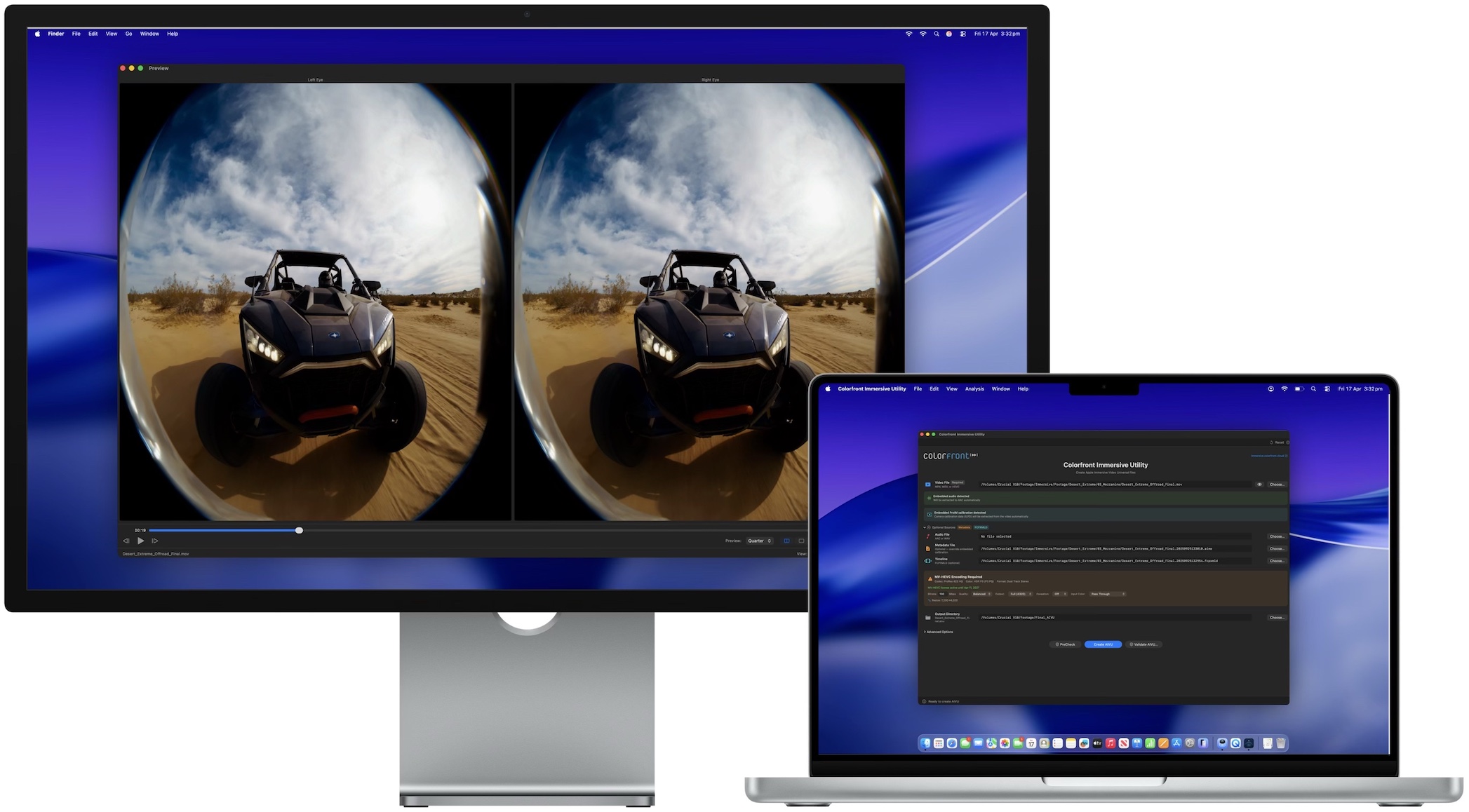
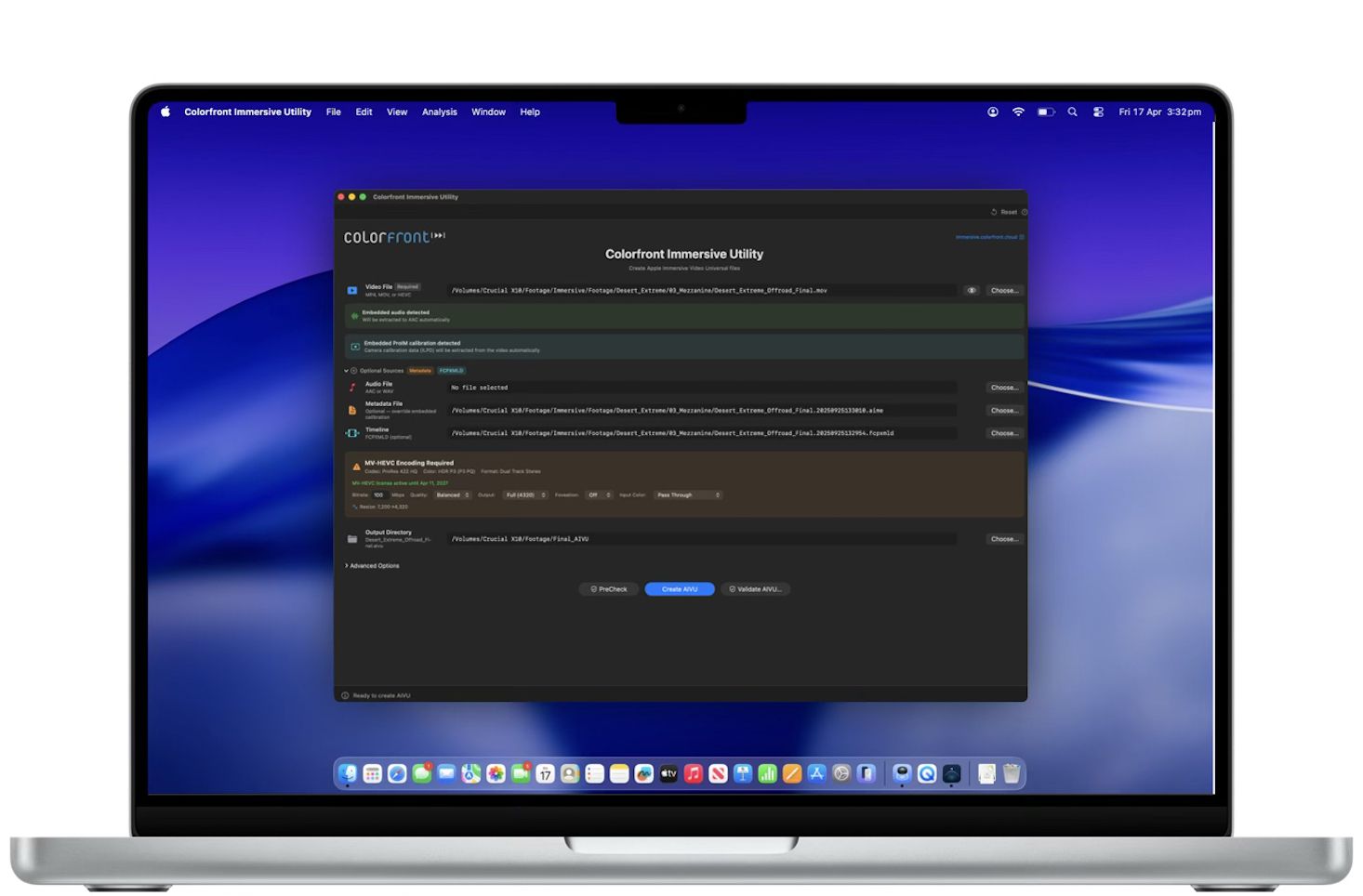
Colorfront Immersive Utility streamlines the process for preparing immersive video content for Apple Vision Pro with a single app. Users select a video file, a metadata file containing camera intrinsics, and an output directory. The app can also auto-detect ILPD calibration data embedded directly in the source video, so a separate metadata file isn't always required. From there, users simply click Create AIVU, and the app handles encoding, audio extraction, and packaging automatically.
"We built Colorfront Immersive Utility to put immersive video production into the hands of every type of creative, whether you're a filmmaker, a documentarian, or a brand telling a story in a completely new medium," said Mark Jaszberenyi, Co-Founder of Colorfront. "Apple Vision Pro has opened up an incredible storytelling canvas, and we wanted to expand access to these tools to as many creatives as possible. The entire pipeline runs on Mac devices with Apple silicon using Metal, so users can go from camera originals to a finished Apple Immersive Video experience."
GPU-accelerated MV-HEVC encoding
When the source video is ProRes or another non-HEVC format, Colorfront Immersive Utility encodes it to MV-HEVC using a GPU-accelerated Metal pipeline. Users can set the bitrate anywhere from 0 to 150 Mbps, choose from six quality/performance presets, and output at full 4320p (4320 x 4320 per eye) or half 2160p resolution. A Lanczos-3 resampling filter handles any resolution conversion needed.
Foveation is built into the same GPU pass. It allocates more resolution to the center of the frame, where the viewer typically looks, while gradually reducing resolution toward the edges. Three levels are available (1.25x, 1.5x, and 2.0x center magnification), and because foveation is integrated directly into the Lanczos resampling filter, there is no additional quality loss from a second processing step.
More on illi News
Color space conversion is automatic. The app reads the video's embedded color metadata (NCLC/CICP tags) and converts to P3 D65 PQ at 108 nits, the target color space for Apple Immersive Video. Manual overrides are available for SDR BT.709, HDR10 BT.2020, and other source formats. The entire encoding pipeline processes video at 10-bit precision.
Spatial audio with APAC conversion
Colorfront Immersive Utility automatically detects and extracts embedded audio tracks from the source video to AAC. When a separate WAV file is provided instead, the app converts it to Apple Positional Audio Codec (APAC) for spatial playback on Apple Vision Pro. Three APAC bitrate tiers are available: 384 kbps, 512 kbps (default), and 768 kbps. A configurable fade-in (0 to 60 seconds) can be applied at the beginning of the file.
Multi-shot AIVU with Final Cut Pro XML timelines
The app supports multi-shot AIVU files through Final Cut Pro XML timeline import. Each shot in the timeline references a camera ID, start time, and duration. During AIVU creation, shot boundaries are encoded as setCamera presentation commands in the output file, so Apple Vision Pro can switch between camera perspectives automatically during playback.
Source PreCheck
Before starting any encode, users can run Source PreCheck, a pre-flight validation tool that analyzes video, audio, metadata, and timeline files for potential issues without beginning the creation process. PreCheck grades results by severity: errors that block AIVU creation, warnings worth reviewing, and informational notes. Results are grouped by category (Video, Audio, Metadata, Compatibility). Source PreCheck is available without a license.
Result validation and light level analysis
After an AIVU file is created, the app can validate it with a GPU-accelerated light level analysis that measures MaxCLL, MaxFALL, AvgFALL, and other metrics on every frame of the video. For stereo MV-HEVC content, left and right eye layers are analyzed independently. The validation flags frames that exceed the 108-nit maximum brightness of the Apple Vision Pro display. A parallel analysis mode splits the file in two halves and analyzes them concurrently for roughly 2x faster processing.
More on illi News
Validation results can be exported as a multi-page PDF report with light level graphs, shot lists with thumbnails, and the brightest frames from the video. Additional analysis tools include PSNR/SSIM quality metrics for comparing source and encoded files, with per-eye breakdown and overlay charts for stereo content. The app also integrates with Apple Video Quality Tool (AVQT) for no-reference quality scoring of the main eye when AVQT is installed.
Real-time GPU preview
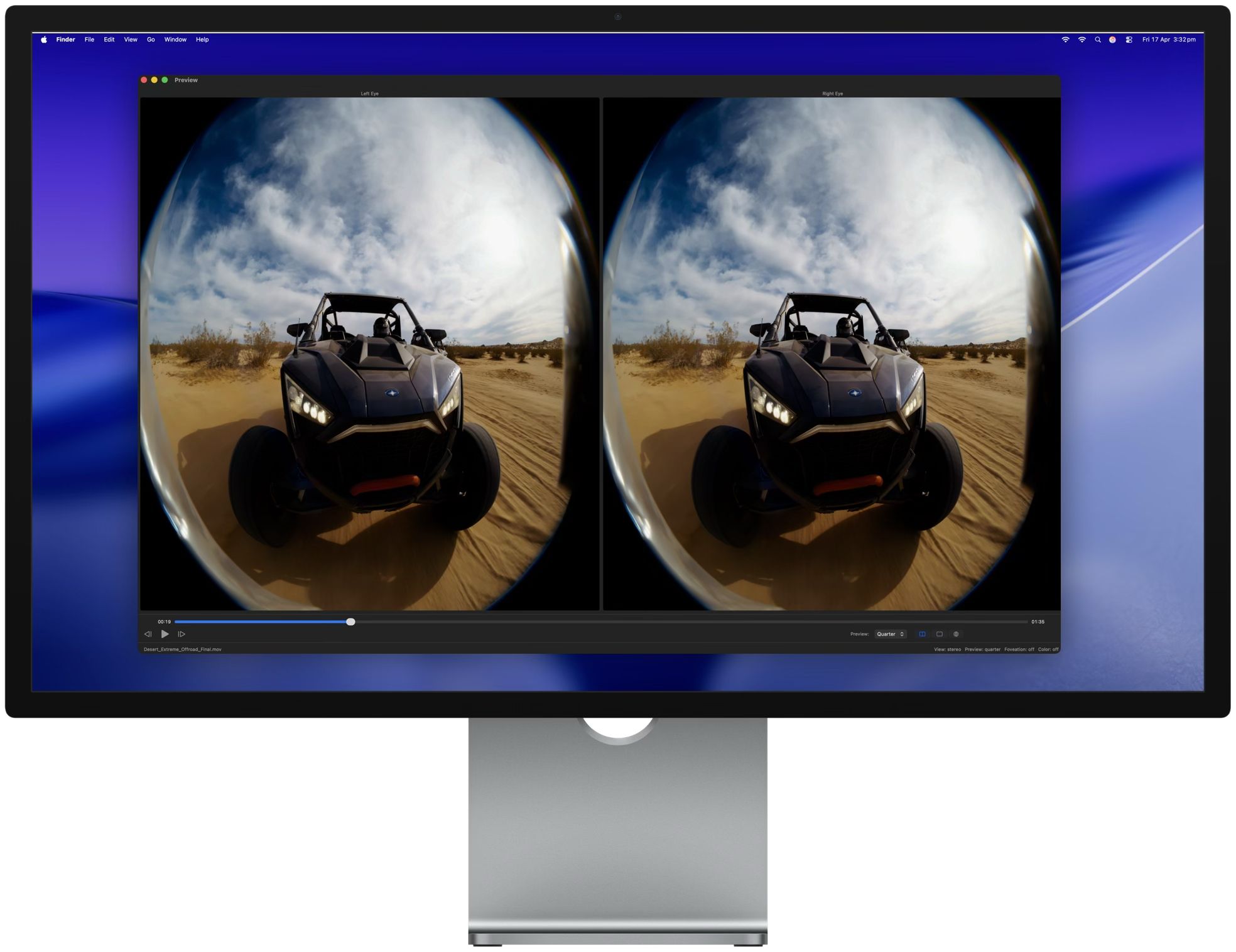
A built-in preview window provides real-time GPU-accelerated playback of the processed video. The preview is synchronized with the main window settings, so changes to foveation level, color space, or other parameters are reflected immediately. View modes include stereo (dual eye), single eye (left or right), and an immersive perspective view. Preview quality can be set to full, half, or quarter resolution.
Pricing and availability
Colorfront Immersive Utility is available today on the Mac App Store. It requires macOS 26.0 (Tahoe) or later, a Mac with Apple silicon (M1 or later required), and at least 16 GB of RAM (32 GB or more recommended for 8K content).
The free tier includes file import and inspection, stereo format and codec detection, real-time preview, MV-HEVC passthrough packaging (no encoding), and Source PreCheck. The MV-HEVC License is a one-year non-renewing subscription at $299 USD. It unlocks GPU-accelerated encoding from ProRes and other non-HEVC formats, result validation with light level analysis, PSNR/SSIM and AVQT quality metrics, and PDF report generation. The license is verified through the App Store and supports Restore Purchases.
For more information, visit immersive.colorfront.cloud.
Link to Colorfront Immersive Utility on Mac App Store
https://apps.apple.com/us/app/colorfront-immersive-utility/id6758009531?mt=12
About Colorfront
Colorfront develops color science and post-production software used by studios and content creators worldwide. The company was founded in Budapest, Hungary. More information is available at www.colorfront.com.
Colorfront Immersive Utility streamlines the process for preparing immersive video content for Apple Vision Pro with a single app. Users select a video file, a metadata file containing camera intrinsics, and an output directory. The app can also auto-detect ILPD calibration data embedded directly in the source video, so a separate metadata file isn't always required. From there, users simply click Create AIVU, and the app handles encoding, audio extraction, and packaging automatically.
"We built Colorfront Immersive Utility to put immersive video production into the hands of every type of creative, whether you're a filmmaker, a documentarian, or a brand telling a story in a completely new medium," said Mark Jaszberenyi, Co-Founder of Colorfront. "Apple Vision Pro has opened up an incredible storytelling canvas, and we wanted to expand access to these tools to as many creatives as possible. The entire pipeline runs on Mac devices with Apple silicon using Metal, so users can go from camera originals to a finished Apple Immersive Video experience."
GPU-accelerated MV-HEVC encoding
When the source video is ProRes or another non-HEVC format, Colorfront Immersive Utility encodes it to MV-HEVC using a GPU-accelerated Metal pipeline. Users can set the bitrate anywhere from 0 to 150 Mbps, choose from six quality/performance presets, and output at full 4320p (4320 x 4320 per eye) or half 2160p resolution. A Lanczos-3 resampling filter handles any resolution conversion needed.
Foveation is built into the same GPU pass. It allocates more resolution to the center of the frame, where the viewer typically looks, while gradually reducing resolution toward the edges. Three levels are available (1.25x, 1.5x, and 2.0x center magnification), and because foveation is integrated directly into the Lanczos resampling filter, there is no additional quality loss from a second processing step.
More on illi News
- Exploring Our National Parks Volume 3 Documentary Film Now Available
- $29.8 Million Record Setting Q1 with Boosted Annual Guidance to $160 Million for Expanding Pre-Owned Boat Dealer: Off The Hook YS, Inc. N Y S E: OTH
- All About Technology Celebrates 25 Years of Bridging Detroit's Digital Divide
- iatroX surpasses 500,000 clinical queries and expands specialist exam coverage
- Inside-Out Hollywood: The Relentless Rise of Joseph Nybyk (AKA Joseph Neibich)
Color space conversion is automatic. The app reads the video's embedded color metadata (NCLC/CICP tags) and converts to P3 D65 PQ at 108 nits, the target color space for Apple Immersive Video. Manual overrides are available for SDR BT.709, HDR10 BT.2020, and other source formats. The entire encoding pipeline processes video at 10-bit precision.
Spatial audio with APAC conversion
Colorfront Immersive Utility automatically detects and extracts embedded audio tracks from the source video to AAC. When a separate WAV file is provided instead, the app converts it to Apple Positional Audio Codec (APAC) for spatial playback on Apple Vision Pro. Three APAC bitrate tiers are available: 384 kbps, 512 kbps (default), and 768 kbps. A configurable fade-in (0 to 60 seconds) can be applied at the beginning of the file.
Multi-shot AIVU with Final Cut Pro XML timelines
The app supports multi-shot AIVU files through Final Cut Pro XML timeline import. Each shot in the timeline references a camera ID, start time, and duration. During AIVU creation, shot boundaries are encoded as setCamera presentation commands in the output file, so Apple Vision Pro can switch between camera perspectives automatically during playback.
Source PreCheck
Before starting any encode, users can run Source PreCheck, a pre-flight validation tool that analyzes video, audio, metadata, and timeline files for potential issues without beginning the creation process. PreCheck grades results by severity: errors that block AIVU creation, warnings worth reviewing, and informational notes. Results are grouped by category (Video, Audio, Metadata, Compatibility). Source PreCheck is available without a license.
Result validation and light level analysis
After an AIVU file is created, the app can validate it with a GPU-accelerated light level analysis that measures MaxCLL, MaxFALL, AvgFALL, and other metrics on every frame of the video. For stereo MV-HEVC content, left and right eye layers are analyzed independently. The validation flags frames that exceed the 108-nit maximum brightness of the Apple Vision Pro display. A parallel analysis mode splits the file in two halves and analyzes them concurrently for roughly 2x faster processing.
More on illi News
- SRK Collective Media Group Launches with a Modern Approach to Media, Authority Building, and Cultural Visibility
- MSBG Corporation Acquires GridWatch US Telemetry Automation System
- TAYP Expands Athlete Exposure Platform Beyond Georgia With New Push Into Virginia and the 757
- KT Medical Staffing Expands Concierge Nursing and Private Duty Nursing Services in Orange County
- Mayor Brandon Johnson, Department of Planning and Development Announce Neighborhood Opportunity Fund Grants For 11 Chicago Businesses
Validation results can be exported as a multi-page PDF report with light level graphs, shot lists with thumbnails, and the brightest frames from the video. Additional analysis tools include PSNR/SSIM quality metrics for comparing source and encoded files, with per-eye breakdown and overlay charts for stereo content. The app also integrates with Apple Video Quality Tool (AVQT) for no-reference quality scoring of the main eye when AVQT is installed.
Real-time GPU preview
A built-in preview window provides real-time GPU-accelerated playback of the processed video. The preview is synchronized with the main window settings, so changes to foveation level, color space, or other parameters are reflected immediately. View modes include stereo (dual eye), single eye (left or right), and an immersive perspective view. Preview quality can be set to full, half, or quarter resolution.
Pricing and availability
Colorfront Immersive Utility is available today on the Mac App Store. It requires macOS 26.0 (Tahoe) or later, a Mac with Apple silicon (M1 or later required), and at least 16 GB of RAM (32 GB or more recommended for 8K content).
The free tier includes file import and inspection, stereo format and codec detection, real-time preview, MV-HEVC passthrough packaging (no encoding), and Source PreCheck. The MV-HEVC License is a one-year non-renewing subscription at $299 USD. It unlocks GPU-accelerated encoding from ProRes and other non-HEVC formats, result validation with light level analysis, PSNR/SSIM and AVQT quality metrics, and PDF report generation. The license is verified through the App Store and supports Restore Purchases.
For more information, visit immersive.colorfront.cloud.
Link to Colorfront Immersive Utility on Mac App Store
https://apps.apple.com/us/app/colorfront-immersive-utility/id6758009531?mt=12
About Colorfront
Colorfront develops color science and post-production software used by studios and content creators worldwide. The company was founded in Budapest, Hungary. More information is available at www.colorfront.com.
Source: Colorfront
0 Comments
Latest on illi News
- SpeedyIndex Rolls Out Automated API for Mass URL Verification, Solving the Backlink Blind Spot for SEO Agencies
- KLEKT Announces Appointment of Jay Kimpton to Board of Directors
- Michigan Attorney General Closed FGM Licensing Investigations Months Before Federal Case Ended, Records Show
- Mensa Foundation Event Reframes Brain Health for Every Age
- Mayor Brandon Johnson and Chicago Department of Public Health Announce Citywide Expansion of Care Program
- DLT Resolution, Inc. (Stock Symbol: DLTI) Expands Into the $224 Billion Life Settlements Market While Accelerating Telecom Growth Across Canada
- Chicago Pond Maintenance in May - Helps Homeowners Control Algae and Improve Water Quality
- Ashley Wineland's 'Love + Heartbreak' Tour Brings her Emotional and Empowering Album 'Wineland' to Nationwide Audiences
- People & Stories/Gente y Cuentos Welcomes Two New Trustees as Organization Enters 54th Year and Expands Community Reach
- Mayor Brandon Johnson and Park District CEO Ramirez-Rosa Cut the Ribbon on New Carver Park Playground, Launching Chicago Grows Together Initiative, and Announce Mayor Johnson's Participation in Mayors for Parks Coalition
- With a Dream and a Team, Monalisa Okojie Is Empowering the Next Generation Through EXPOSE NGO
- American Properties Realty, Inc. Celebrates 2026 FAME Awards - Community of the Year - Heritage at South Brunswick
- BCD Meetings & Events Introduces Strategic Production Management Offering in North America
- Chicago: Mayor Brandon Johnson Breaks Ground on Blocks Together Community Plaza in West Humboldt Park
- Mel Blackwell to Keynote 2026 NSSF Marketing and Leadership Summit
- SmartCone and Samsung Launch RoadDefender™ to Enhance Real-Time Safety for Roadside Workers
- The Personal Development Industry Has a Blind Spot Says Global Personal Success Guru Omar L. Harris
- Kevin "Mr. Wonderful" O'Leary Begins New Universal Coin & Bullion Promotion of Gold and Silver
- Flamingo Compliance Launches Schengen Area Trip Planning Tools as New Digital Border Controls Take Effect
- HHS Announces Major Push to Address Psychiatric Drug Risks: CCHR Applauds Focus on Informed Consent and Safe Tapering